
Wired Vs. Wireless Smart Home Network Installation in Atlanta GA - A Guide for Homes and Small Businesses
Table of Contents
- Determining If Your Small Business Needs Network Installation
- Benefits of Choosing Wireless Over Wired Networks
- How to Set Up a Wireless Home Network
- Connecting Devices and Ensuring Strong Security
- Key Features to Look for When Buying Equipment
- Purchasing the Essential Hardware
- Pros and Cons of Home Network Systems
- Wired Versus Wireless for Smart Home Devices
- Performance Comparison Between Wired and Wireless
- Cost Breakdown for Different Options
- Best Use Cases and Recommended Protocols
- Installation Tips for Success
- Choosing the Right Professional Installer
- Additional Considerations and Tips
- FAQs
- Final Words
Smart home network installation can completely change how your family or small business operates every day. Many people in Atlanta GA now rely on reliable connections to share data and control devices smoothly. This guide explains everything you need to know and which system to choose wired vs. wireless smart home network. You will discover practical options that fit your exact needs without any confusion.
Determining If Your Small Business Needs Network Installation
Small businesses today depend heavily on computers, cloud services, and networks for daily success in a competitive environment. You can easily determine the need for a new network by checking if your current setup faces bandwidth limits, frequent drops, or security gaps with 5+ devices. Network installation in Atlanta GA often becomes essential for teams handling shared files, video calls, or IoT devices like POS systems.
The system lets every employee access cloud files or local servers right from their own desk. If you rely on tools like Google Workspace alongside smart devices, consider hiring an experienced IT professional. These experts assess your unique office needs, like VLANs for guest Wi-Fi, and build a custom solution that scales.
You can also upgrade existing hardware with PoE switches over time. Professionals charge based on scope, often $100–$200/hour in Atlanta, and most owners see returns through better efficiency.
For more information, read our guide: What to Know Before Upgrading Your Smart Home System
Benefits of Choosing Wireless Over Wired Networks
Wireless network installation feels fast and simple once you decide to make the switch. You can connect multiple computers and devices without running cables through walls or ceilings. Radio waves via Wi-Fi 6/7 or mesh systems like Zigbee handle communication with good range in typical Atlanta homes.
Wireless setup in Atlanta GA connects every device to access points or hubs for smooth operation. WPA3 encryption and separate IoT SSIDs protect your system effectively. Many families and small offices prefer this for its flexibility in rentals or expansions.
How to Set Up a Wireless Home Network
The average Atlanta home today features smartphones, laptops, TVs, and smart devices rather than just desktops. Your main internet comes via fiber or cable modem anywhere in the house. Without a proper network, devices compete for signal or create dead zones; a wireless mesh solves this affordably.
You simply buy a Wi-Fi 6/7 router or mesh system that sends data through advanced waves. Modern devices have built-in Wi-Fi, no extra cards needed, making it plug-and-play. Standards like Matter ensure reliability across brands for most users.
Connecting Devices and Ensuring Strong Security
Careful planning helps you connect every piece in your home network chain. Place your router or mesh nodes centrally, connected to the modem. Use the app-based setup wizard, no CD required, for quick configuration.
Your modem, router, and devices recognize each other via automatic protocols. Enable WPA3, guest networks, and IoT VLANs to finish securely. This delivers fast, protected results even for beginners.
Key Features to Look for When Buying Equipment
Choose a wireless router or mesh with multi-gig ports, beamforming, and app controls for strong coverage. Prioritize WPA3 encryption, MU-MIMO, and Matter/Thread support to secure and unify devices. Built-in Wi-Fi covers laptops; add Ethernet adapters only for wired needs.
Purchasing the Essential Hardware
Shop around carefully before buying network equipment for your Atlanta home. Prices vary, mesh systems start at $300–$800 but check compatibility with your ISP like AT&T Fiber. Online stores offer deals; match to your fiber modem for best results.
Research hybrid options to balance wired reliability with wireless ease. You'll find setup straightforward for DIY confidence.
Pros and Cons of Home Network Systems
|
Aspect |
Pros |
Cons |
|
Internet Sharing |
Multiple users online at once |
Bandwidth divides under heavy load |
|
Overall Cost |
One ISP connection suffices |
Upfront hardware for coverage |
|
File Sharing |
Cloud/local access from anywhere |
Needs backups to avoid data loss |
|
Family Activities |
Multi-player games, streaming |
Latency in crowded Wi-Fi |
|
Internet Speed |
Gig speeds possible |
Slower with interference |
|
Security |
WPA3, VLANs protect well |
Hackable if unpatched; segment IoT |
A home network shines when family or staff need simultaneous access for work or fun. Weigh these for your setup.
Wired Vs. Wireless for Smart Home Devices
Wired networks use Ethernet cables for smart devices while wireless relies on Wi-Fi, Zigbee, or Thread. Both support lights, thermostats, cameras, and speakers. They differ in stability, ease, and bandwidth for 2026 demands.
Performance Comparison Between Wired and Wireless Smart Home Network
|
Aspect |
Wired (Cat6/6A) |
Wireless (Wi-Fi 7, Zigbee/Z-Wave) |
|
Speed |
Up to 10 Gbps, low latency |
2–5 Gbps, improving latency |
|
Reliability |
99.99% uptime, no interference |
98–99%, drops possible |
|
Security |
High (physical access only) |
Strong with WPA3/VLANs |
|
Device Capacity |
Unlimited per switch |
250+ with mesh/Thread |
|
Power |
Continuous via PoE |
Batteries or outlets |
|
Latency |
1–5 ms |
5–20 ms |
Wired excels in interference-free stability for critical uses. Wireless offers quick installs and mobility.
Cost Breakdown for Different Options
|
Item |
Wired Cost Range |
Wireless Cost Range |
|
Full Home Setup (2,000 sq ft) |
$3,000–$12,000 (cables+labor) |
$400–$2,500 (mesh/DIY) |
|
Per Room Labor |
$150–$400 |
$0–$200 (pro placement) |
|
Annual Maintenance |
Minimal |
$20–$100 (batteries/updates) |
|
Cable/Device Cost |
$0.75–$2.50/ft |
$100–$400 per hub/device |
Wired costs more upfront in Atlanta but saves long-term on troubleshooting.
Best Use Cases and Recommended Protocols
Wired suits new builds, cameras, and NAS for flawless performance. Wireless fits lights, sensors, and assistants in retrofits. Hybrid, wired backbone with wireless endpoints, works best overall.
Wired: Cat6A, PoE++.
Wireless: Wi-Fi 7, Matter/Thread for 250+ devices.
Installation Tips for Success
Plan Cat6 runs to a central panel for wired. Use mesh nodes or pre-wired APs for wireless in 3,000+ sq ft homes. Test with apps like WiFi Analyzer.
Choosing the Right Professional Installer
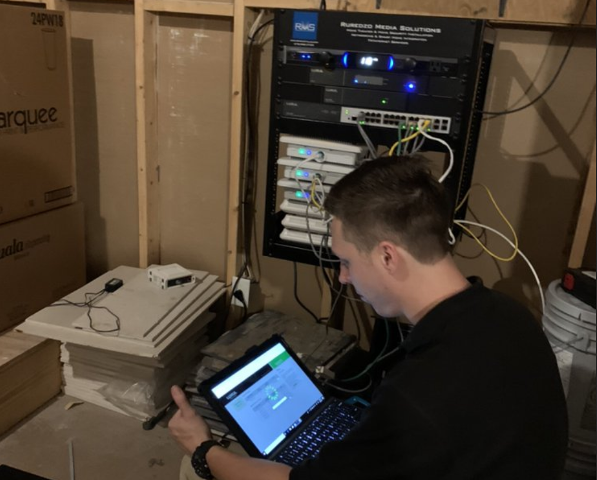
Selecting the right installer requires careful thought to avoid future headaches. Choose experienced Atlanta GA companies like RMS Installs that offer consultations and custom hybrid designs. Our experienced professionals handle wiring, testing, and training for confidence.
Additional Considerations and Tips
Map your layout for dead zones and future AI devices before deciding. Hybrid delivers top reliability with convenience. Schedule annual checks for smooth operation.
Need help deciding between options? Our wired and wireless network installation guide breaks it down
FAQs - Wired vs. Wireless Home Network Installation in Atlanta
1. How do I know if my home needs a network upgrade right now?
If you experience frequent buffering, video call drops, dead zones, or lag with 20 or more connected devices, your network may be overloaded. Older Wi-Fi 4 or Wi-Fi 5 routers often struggle with modern smart homes and higher internet speeds.
2. Is wireless network installation safe enough for sensitive family data?
Yes, when properly configured. Modern routers support WPA3 encryption, automatic firmware updates, firewalls, and VLAN segmentation. Strong passwords, two-factor authentication, and disabling unused features significantly reduce cyber risks and protect financial, personal, and smart home data.
3. What is the typical cost range for a full smart home network in Atlanta?
A professional wireless or mesh setup typically ranges from $400 to $2,500, depending on coverage and equipment quality. Wired or hybrid systems with Ethernet cabling, rack setups, and advanced configuration often start around $3,000 and increase with home size.
4. Can I install a wireless system myself without professional help?
Yes, many modern mesh systems include mobile apps that guide setup step by step. Basic installations are manageable for small homes. However, larger properties, structured wiring, advanced security segmentation, or performance optimization may benefit from professional configuration.
5. Should I choose wired or wireless for security cameras?
A hybrid approach works best. Wired connections with PoE provide stable power and data transmission. Modern Wi-Fi 6 and Wi-Fi 7 cameras perform well, but wired backhaul improves reliability, especially for continuous recording and high-resolution surveillance systems.
6. Ethernet vs. wireless internet — which is better for performance and reliability?
Ethernet provides faster, more stable speeds with minimal latency, making it ideal for gaming, 4K streaming, and remote work. Wireless offers flexibility and mobility but can face signal interference. Many homeowners combine both for optimal performance and convenience.
7. What are the cost differences between wired and wireless home networks for smart devices?
Wireless networks usually cost $300 to $1,800 for routers and mesh systems. Fully wired smart home networks range from $1,500 to $4,000 or more due to cabling and labor. Hybrid systems balance cost, performance, and long-term scalability.
Final Words
Smart home network installation truly transforms daily life for families and small businesses across Atlanta GA. Expert teams guide thousands through these upgrades yearly with proven results. We make the process simple and stress-free from consultation to go-live.
RMS Installs specializes in wired and wireless network installation in Atlanta tailored to your exact needs. From planning and cabling to secure configuration and testing, our team ensures reliable performance and long-term scalability. Call us today at (470) 456-3108 to schedule your consultation.
Table of Contents
- Determining If Your Small Business Needs Network Installation
- Benefits of Choosing Wireless Over Wired Networks
- How to Set Up a Wireless Home Network
- Connecting Devices and Ensuring Strong Security
- Key Features to Look for When Buying Equipment
- Purchasing the Essential Hardware
- Pros and Cons of Home Network Systems
- Wired Versus Wireless for Smart Home Devices
- Performance Comparison Between Wired and Wireless
- Cost Breakdown for Different Options
- Best Use Cases and Recommended Protocols
- Installation Tips for Success
- Choosing the Right Professional Installer
- Additional Considerations and Tips
- FAQs
- Final Words
Smart home network installation can completely change how your family or small business operates every day. Many people in Atlanta GA now rely on reliable connections to share data and control devices smoothly. This guide explains everything you need to know and which system to choose wired vs. wireless smart home network. You will discover practical options that fit your exact needs without any confusion.
Determining If Your Small Business Needs Network Installation
Small businesses today depend heavily on computers, cloud services, and networks for daily success in a competitive environment. You can easily determine the need for a new network by checking if your current setup faces bandwidth limits, frequent drops, or security gaps with 5+ devices. Network installation in Atlanta GA often becomes essential for teams handling shared files, video calls, or IoT devices like POS systems.
The system lets every employee access cloud files or local servers right from their own desk. If you rely on tools like Google Workspace alongside smart devices, consider hiring an experienced IT professional. These experts assess your unique office needs, like VLANs for guest Wi-Fi, and build a custom solution that scales.
You can also upgrade existing hardware with PoE switches over time. Professionals charge based on scope, often $100–$200/hour in Atlanta, and most owners see returns through better efficiency.
For more information, read our guide: What to Know Before Upgrading Your Smart Home System
Benefits of Choosing Wireless Over Wired Networks
Wireless network installation feels fast and simple once you decide to make the switch. You can connect multiple computers and devices without running cables through walls or ceilings. Radio waves via Wi-Fi 6/7 or mesh systems like Zigbee handle communication with good range in typical Atlanta homes.
Wireless setup in Atlanta GA connects every device to access points or hubs for smooth operation. WPA3 encryption and separate IoT SSIDs protect your system effectively. Many families and small offices prefer this for its flexibility in rentals or expansions.
How to Set Up a Wireless Home Network
The average Atlanta home today features smartphones, laptops, TVs, and smart devices rather than just desktops. Your main internet comes via fiber or cable modem anywhere in the house. Without a proper network, devices compete for signal or create dead zones; a wireless mesh solves this affordably.
You simply buy a Wi-Fi 6/7 router or mesh system that sends data through advanced waves. Modern devices have built-in Wi-Fi, no extra cards needed, making it plug-and-play. Standards like Matter ensure reliability across brands for most users.
Connecting Devices and Ensuring Strong Security
Careful planning helps you connect every piece in your home network chain. Place your router or mesh nodes centrally, connected to the modem. Use the app-based setup wizard, no CD required, for quick configuration.
Your modem, router, and devices recognize each other via automatic protocols. Enable WPA3, guest networks, and IoT VLANs to finish securely. This delivers fast, protected results even for beginners.
Key Features to Look for When Buying Equipment
Choose a wireless router or mesh with multi-gig ports, beamforming, and app controls for strong coverage. Prioritize WPA3 encryption, MU-MIMO, and Matter/Thread support to secure and unify devices. Built-in Wi-Fi covers laptops; add Ethernet adapters only for wired needs.
Purchasing the Essential Hardware
Shop around carefully before buying network equipment for your Atlanta home. Prices vary, mesh systems start at $300–$800 but check compatibility with your ISP like AT&T Fiber. Online stores offer deals; match to your fiber modem for best results.
Research hybrid options to balance wired reliability with wireless ease. You'll find setup straightforward for DIY confidence.
Pros and Cons of Home Network Systems
|
Aspect |
Pros |
Cons |
|
Internet Sharing |
Multiple users online at once |
Bandwidth divides under heavy load |
|
Overall Cost |
One ISP connection suffices |
Upfront hardware for coverage |
|
File Sharing |
Cloud/local access from anywhere |
Needs backups to avoid data loss |
|
Family Activities |
Multi-player games, streaming |
Latency in crowded Wi-Fi |
|
Internet Speed |
Gig speeds possible |
Slower with interference |
|
Security |
WPA3, VLANs protect well |
Hackable if unpatched; segment IoT |
A home network shines when family or staff need simultaneous access for work or fun. Weigh these for your setup.
Wired Vs. Wireless for Smart Home Devices
Wired networks use Ethernet cables for smart devices while wireless relies on Wi-Fi, Zigbee, or Thread. Both support lights, thermostats, cameras, and speakers. They differ in stability, ease, and bandwidth for 2026 demands.
Performance Comparison Between Wired and Wireless Smart Home Network
|
Aspect |
Wired (Cat6/6A) |
Wireless (Wi-Fi 7, Zigbee/Z-Wave) |
|
Speed |
Up to 10 Gbps, low latency |
2–5 Gbps, improving latency |
|
Reliability |
99.99% uptime, no interference |
98–99%, drops possible |
|
Security |
High (physical access only) |
Strong with WPA3/VLANs |
|
Device Capacity |
Unlimited per switch |
250+ with mesh/Thread |
|
Power |
Continuous via PoE |
Batteries or outlets |
|
Latency |
1–5 ms |
5–20 ms |
Wired excels in interference-free stability for critical uses. Wireless offers quick installs and mobility.
Read: Effortless Living: How Home Automation Simplifies Your Life
Cost Breakdown for Different Options
|
Item |
Wired Cost Range |
Wireless Cost Range |
|
Full Home Setup (2,000 sq ft) |
$3,000–$12,000 (cables+labor) |
$400–$2,500 (mesh/DIY) |
|
Per Room Labor |
$150–$400 |
$0–$200 (pro placement) |
|
Annual Maintenance |
Minimal |
$20–$100 (batteries/updates) |
|
Cable/Device Cost |
$0.75–$2.50/ft |
$100–$400 per hub/device |
Wired costs more upfront in Atlanta but saves long-term on troubleshooting.
Best Use Cases and Recommended Protocols
Wired suits new builds, cameras, and NAS for flawless performance. Wireless fits lights, sensors, and assistants in retrofits. Hybrid, wired backbone with wireless endpoints, works best overall.
Wired: Cat6A, PoE++.
Wireless: Wi-Fi 7, Matter/Thread for 250+ devices.
Installation Tips for Success
Plan Cat6 runs to a central panel for wired. Use mesh nodes or pre-wired APs for wireless in 3,000+ sq ft homes. Test with apps like WiFi Analyzer.
Choosing the Right Professional Installer
Selecting the right installer requires careful thought to avoid future headaches. Choose experienced Atlanta GA companies like RMS Installs that offer consultations and custom hybrid designs. Our experienced professionals handle wiring, testing, and training for confidence.
Additional Considerations and Tips
Map your layout for dead zones and future AI devices before deciding. Hybrid delivers top reliability with convenience. Schedule annual checks for smooth operation.
FAQs - Wired vs. Wireless Home Network Installation in Atlanta
1. How do I know if my home needs a network upgrade right now?
If you experience frequent buffering, video call drops, dead zones, or lag with 20 or more connected devices, your network may be overloaded. Older Wi-Fi 4 or Wi-Fi 5 routers often struggle with modern smart homes and higher internet speeds.
2. Is wireless network installation safe enough for sensitive family data?
Yes, when properly configured. Modern routers support WPA3 encryption, automatic firmware updates, firewalls, and VLAN segmentation. Strong passwords, two-factor authentication, and disabling unused features significantly reduce cyber risks and protect financial, personal, and smart home data.
3. What is the typical cost range for a full smart home network in Atlanta?
A professional wireless or mesh setup typically ranges from $400 to $2,500, depending on coverage and equipment quality. Wired or hybrid systems with Ethernet cabling, rack setups, and advanced configuration often start around $3,000 and increase with home size.
4. Can I install a wireless system myself without professional help?
Yes, many modern mesh systems include mobile apps that guide setup step by step. Basic installations are manageable for small homes. However, larger properties, structured wiring, advanced security segmentation, or performance optimization may benefit from professional configuration.
5. Should I choose wired or wireless for security cameras?
A hybrid approach works best. Wired connections with PoE provide stable power and data transmission. Modern Wi-Fi 6 and Wi-Fi 7 cameras perform well, but wired backhaul improves reliability, especially for continuous recording and high-resolution surveillance systems.
6. Ethernet vs. wireless internet — which is better for performance and reliability?
Ethernet provides faster, more stable speeds with minimal latency, making it ideal for gaming, 4K streaming, and remote work. Wireless offers flexibility and mobility but can face signal interference. Many homeowners combine both for optimal performance and convenience.
7. What are the cost differences between wired and wireless home networks for smart devices?
Wireless networks usually cost $300 to $1,800 for routers and mesh systems. Fully wired smart home networks range from $1,500 to $4,000 or more due to cabling and labor. Hybrid systems balance cost, performance, and long-term scalability.
Final Words
Smart home network installation truly transforms daily life for families and small businesses across Atlanta GA. Expert teams guide thousands through these upgrades yearly with proven results. We make the process simple and stress-free from consultation to go-live.
RMS Installs specializes in wired, wireless, and hybrid smart network installations tailored to your exact needs. From planning and cabling to secure configuration and testing, our team ensures reliable performance and long-term scalability. Call us today at (470) 456-3108 to schedule your consultation.
Certified partners






Click Here to Fill The Form Online or Call us at:

Business Hours
| Monday | 08:00 AM - 06:00 PM |
| Tuesday | 08:00 AM - 06:00 PM |
| Wednesday | 08:00 AM - 06:00 PM |
| Thursday | 08:00 AM - 06:00 PM |
| Friday | 08:00 AM - 06:00 PM |
| Saturday | 10:00 AM - 05:00 PM |
| Sunday | (Closed) |