
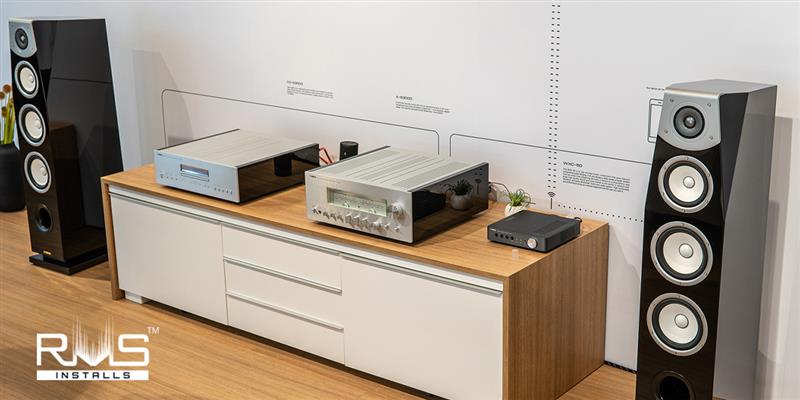
Where to Place Your AV Receiver for a Clean & Safe Home Theater
Home theater enthusiasts know that every detail counts for peak performance. From extensive experience fine-tuning audio systems, understanding where to place AV receivers for home theater is especially important. Proper placement supports efficient cooling and helps extend equipment life, whether the setup is a basic 2.1 system or an advanced 11.1 channel configuration.
Poor ventilation is a common cause of overheating, which can lead to unexpected shutdowns and reduced longevity. That’s why we consistently recommend open, well-ventilated locations for reliable, long-term performance.
Below, we outline a step-by-step approach grounded in proven best practices.
Where to Place AV Receiver for Home Theater - Best Practices
Step 1: Evaluate Your Room Layout
Begin by examining your space thoroughly. Consider the room's dimensions and speaker arrangement, whether it's a straightforward stereo setup, a 5.1 system with surround speakers, or a 9.1 configuration including height channels. Position the receiver close to your display or projector. This strategy keeps HDMI cables under 25 feet to prevent signal degradation.
Centralize the unit within 6-10 feet of the TV or projector and your speakers. Such placement minimizes cable clutter. Steer clear of corners, where bass can accumulate and distort subwoofer low-frequency effects. Mount it level on a stable surface, such as an open shelf or dedicated rack. Elevate it at least 12-18 inches above the floor to avoid dust buildup.
Step 2: Focus on Ventilation and Clearance
Heat management is critical for AV receivers, which produce substantial warmth while powering multiple channels. Provide ample space around the device: 2-3 inches (5-7.6 cm) on all sides. For the top vent, allow at least 5-6 inches (12.7-15.2 cm) to facilitate hot air expulsion.
Opt for vented shelves or racks made of perforated metal to promote passive airflow. Solid wood surfaces hinder this process. Place the receiver at the top of any equipment stack so rising heat escapes unimpeded. Avoid positioning other components directly above or below it. Rising hot air from amplifiers can compromise cooling, and bottom placements may obstruct fans that draw air from the sides or front.
Not sure where to start? Explore our AV receiver and home theater installation services.
For quick reference, review this table on minimum clearance guidelines:
|
Side/Area |
Minimum Clearance |
|
Sides |
2-3 inches (5-7.6 cm) |
|
Rear |
4-6 inches |
|
Top (above vent) |
5-6 inches (12.7-15.2 cm) |
|
Bottom (from floor) |
12-18 inches |
Step 3: Steer Clear of Heat and Environmental Risks
Protect your receiver from excessive temperatures and other hazards. Maintain a distance of at least 12 inches from heat sources like radiators, fireplaces, external amplifiers, or direct sunlight. Operating environments above 104°F (40°C) can activate safety shutdowns.
Avoid high-humidity zones below 90% relative humidity, dusty floors, or carpeted areas that block bottom air intakes. Use feet or spikes to elevate the unit for better circulation. Never install it in enclosed closets without proper ventilation. If a closet is unavoidable, incorporate active exhaust fans that are thermostat-controlled with variable-speed models delivering 50-100 CFM work best.
Step 4: Prioritize Accessibility and Cable Organization
Ease of use enhances any setup. Allow 4-6 inches of space behind the receiver for accessing rear ports, including HDMI, optical, speaker wires, and power connections. Secure cables with Velcro ties or dedicated channels to prevent pinching and maintain a tidy appearance.
Orient the front panel toward your viewing area for unobstructed remote sensor and control access. Ideal height falls between 30-42 inches from the floor, aligning with eye level in the primary seating position. Verify nearby power outlets, preferably on a dedicated 15-20A circuit. This setup avoids extension cords, which can cause voltage drops during high-demand scenarios drawing up to 1000W in 11-channel operation.
Step 5: Perform Final Verifications and Upgrades
Once positioned, conduct thorough tests. Power on the receiver without connected speakers to confirm fan functionality, a quiet hum without unusual noises indicates proper operation. Check ambient room temperature, aiming for 68-77°F (20-25°C) for optimal conditions.
For demanding use, consider enhancements like USB-powered 120mm fans operating at 800-1200 RPM above the vents or rack-mounted blowers. Monitor internal temperatures via the unit's app or display, ensuring they stay below 140°F (60°C). If overheat alerts appear, adjust the placement immediately.
AV Receiver Placement FAQs
What are the ideal clearances for specific AVR models?
Clearances vary by model for optimal fan intake and exhaust. Denon AVR-X series needs 5 inches top and 2 inches sides/rear; Yamaha RX-A series requires 4-6 inches top and 3 inches sides; Marantz Cinema series allows 3-5 inches top with 2 inches sides; Onkyo TX-NR models specify 5-6 inches top and 2-4 inches sides. Always check the manual for exact chassis dimensions.
How much airflow in CFM does a typical AVR need?
Typical AVRs need 50-100 CFM in enclosed setups, with internal fans providing 20-40 CFM passively. High-power 11.1-channel models require 80-150 CFM total to handle 200-500 BTU/hour heat during extended use.
Can I place an AVR in a cabinet with active ventilation?
Yes, use thermostat-controlled fans at 95°F trigger delivering 50-100 CFM variable speed, plus 4+ 120mm vents (2 bottom intake, 2 top exhaust) for negative pressure. Maintain 2-inch internal clearances and monitor temps below 140°F.
Are rack-mounted blowers better than shelf fans for AVRs?
Rack-mounted blowers (80-120 CFM directed flow) outperform shelf fans (30-50 CFM USB models) by creating consistent chimney cooling in stacks without vibration or dust issues. Ideal for 24/7 operation.
What are safe operating temperatures for common AVR brands?
Safe ranges ensure longevity without shutdowns
|
Brand / Model Series |
Maximum Ambient Temperature |
Maximum Internal Temperature |
Automatic Shutdown Temperature |
|
Denon AVR-X |
104°F (40°C) |
140°F (60°C) |
149°F (65°C) |
|
Yamaha RX-A |
95°F (35°C) |
131°F (55°C) |
149°F (65°C) |
|
Marantz Cinema |
104°F (40°C) |
140°F (60°C) |
158°F (70°C) |
|
Onkyo TX-NR |
104°F (40°C) |
140°F (60°C) |
149°F (65°C) |
Conclusion
Proper AV receiver placement in a home theater setup is not a minor detail. It is the backbone of a reliable, high-performance home theater. By planning around room layout, ensuring generous ventilation, avoiding heat and environmental risks, and maintaining clean cable management, you protect your investment while keeping consistent audio performance across any channel configuration.
To truly enjoy the luxury of a professionally optimized home theater, choosing a trusted installation expert is just as important as selecting the right equipment. RMS Installs is a reliable organization with hands-on experience, ensuring your AV receiver, speakers, and display are positioned for maximum performance and long-term reliability. With the professionals at RMS Installs handling your setup, your home theater becomes a seamless, immersive entertainment space that delivers both satisfaction and peace of mind.
Certified partners






Click Here to Fill The Form Online or Call us at:

Business Hours
| Monday | 08:00 AM - 06:00 PM |
| Tuesday | 08:00 AM - 06:00 PM |
| Wednesday | 08:00 AM - 06:00 PM |
| Thursday | 08:00 AM - 06:00 PM |
| Friday | 08:00 AM - 06:00 PM |
| Saturday | 10:00 AM - 05:00 PM |
| Sunday | (Closed) |